เรียน ท่านผู้ใช้บริการ Corporate iCash
ธนาคารมีความยินดีขอเรียนเชิญท่าน เข้าร่วมอบรมเพื่อแนะนำและทบทวนวิธีการใช้งานระบบ Corporate iCash สำหรับ “เจ้าหน้าที่ Maker” ผ่านช่องทางออนไลน์ (Microsoft Teams) โดยมีกำหนดการ ดังนี้
เดือน พฤษภาคม 2569
ลำดับ |
วันที่ |
เวลา |
หลักสูตร |
|---|---|---|---|
1 |
13 พฤษภาคม 2569 |
09.30 – 11.30 (เช้า) |
Payroll & SSO |
2 |
13 พฤษภาคม 2569 |
14.00 – 16.00 (บ่าย) |
International Transfer |
3 |
15 พฤษภาคม 2569 |
09.30 – 11.30 (เช้า) |
Supplier Payment* |
4 |
15 พฤษภาคม 2569 |
14.00 – 16.00 (บ่าย) |
E-Withholding Tax |
5 |
18 พฤษภาคม 2569 |
11.00 – 12.00 (เช้า) |
Administrator User |
6 |
20 พฤษภาคม 2569 |
09.30 – 11.30 (เช้า) |
Payroll & SSO |
7 |
20 พฤษภาคม 2569 |
14.00 – 16.00 (บ่าย) |
International Transfer |
8 |
22 พฤษภาคม 2569 |
09.30 – 11.30 (เช้า) |
Supplier Payment* |
9 |
22 พฤษภาคม 2569 |
14.00 – 16.00 (บ่าย) |
E-Withholding Tax |
เดือน มิถุนายน 2569
ลำดับ |
วันที่ |
เวลา |
หลักสูตร |
|---|---|---|---|
10 |
10 มิถุนายน 2569 |
09.30 – 11.30 (เช้า) |
Payroll & SSO |
11 |
10 มิถุนายน 2569 |
14.00 – 16.00 (บ่าย) |
International Transfer |
12 |
12 มิถุนายน 2569 |
09.30 – 11.30 (เช้า) |
Supplier Payment* |
13 |
12 มิถุนายน 2569 |
14.00 – 16.00 (บ่าย) |
E-Withholding Tax |
14 |
15 มิถุนายน 2569 |
11.00 – 12.00 (เช้า) |
Administrator User |
15 |
17 มิถุนายน 2569 |
09.30 – 11.30 (เช้า) |
Payroll & SSO |
16 |
17 มิถุนายน 2569 |
14.00 – 16.00 (บ่าย) |
International Transfer |
17 |
19 มิถุนายน 2569 |
09.30 – 11.30 (เช้า) |
Supplier Payment* |
18 |
19 มิถุนายน 2569 |
14.00 – 16.00 (บ่าย) |
E-Withholding Tax |
Supplier Payment* ได้แก่บริการโอนเงินให้กับธนาคารกรุงเทพด้วยกัน (Direct Credit), โอนต่างธนาคาร (Smart Credit), โอนผ่านระบบบาทเน็ต (BAHTNET) และชำระสรรพากรออนไลน์ (TAX)
หากท่านมีความประสงค์จะเข้าร่วมอบรม สามารถลงทะเบียนเพื่อสำรองที่นั่งล่วงหน้า ได้โดยการ scan QR Code ด้านล่างนี้

หากต้องการสอบถามข้อมูลเพิ่มเติม ติดต่อ คุณวีรวิชญ์ ไพรวรรณ์ โทร. 098-835-2878 e-mail: ccms.implement@bangkokbank.com
เงื่อนไขในการเข้าอบรม
1. จำกัดผู้เข้าร่วมอบรมต่อห้องเรียนออนไลน์รอบละไม่เกิน 5 – 7 บริษัท บริษัทละไม่เกิน 2 ท่าน เพื่อประสิทธิภาพในการอบรม
2. การสำรองเพื่อเข้าอบรมแบบเรียงลำดับก่อนหลัง หากจำนวนผู้เข้าอบรมเต็มในวันที่ท่านเลือกธนาคารขอสงวนสิทธิ์จัดวันเข้าอบรมออนไลน์ให้ในวันอบรมครั้งถัดไปอ้างอิงตามตามกำหนดการข้างต้น
3. อุปกรณ์ที่จำเป็นต้องใช้งาน
• เครื่อง PC หรือ Laptop ระบบปฏิบัติการ Windows 7 ขึ้นไป พร้อมเชื่อมต่อลำโพงและไมค์โครโฟน
• สามารถเชื่อมต่ออินเทอร์เน็ตและใช้งานเว็บไซด์ภายนอกองค์กรได้
• Browser ที่สามารถใช้งานได้ (Internet Explorer 11, Microsoft Edge, Chrome, Firefox) และกรุณาอัพเดทให้เป็นเวอร์ชั่นล่าสุด
ขอแสดงความนับถือ
กลุ่มงานบริการ CCM
ธนาคารกรุงเทพ จำกัด (มหาชน)
Dear Corporate iCash Member,
We are pleased to invite you to join our Corporate iCash training for “Maker” via an Online Training Channel (Microsoft Teams). The dates for the training sessions are set out below:
May 2026
No. |
Date |
Time |
Course |
|---|---|---|---|
1 |
13 May 2026 |
09.30 – 11.30 (AM) |
Payroll & SSO |
2 |
13 May 2026 |
14.00 – 16.00 (PM) |
International Transfer |
3 |
15 May 2026 |
09.30 – 11.30 (AM) |
Supplier Payment* |
4 |
15 May 2026 |
14.00 – 16.00 (PM) |
E-Withholding Tax |
5 |
18 May 2026 |
11.00 – 12.00 (AM) |
Administrator User |
6 |
20 May 2026 |
09.30 – 11.30 (AM) |
Payroll & SSO |
7 |
20 May 2026 |
14.00 – 16.00 (PM) |
International Transfer |
8 |
22 May 2026 |
09.30 – 11.30 (AM) |
Supplier Payment* |
9 |
22 May 2026 |
14.00 – 16.00 (PM) |
E-Withholding Tax |
June 2026
No. |
Date |
Time |
Course |
|---|---|---|---|
10 |
10 June 2026 |
09.30 – 11.30 (AM) |
Payroll & SSO |
11 |
10 June 2026 |
14.00 – 16.00 (PM) |
International Transfer |
12 |
12 June 2026 |
09.30 – 11.30 (AM) |
Supplier Payment* |
13 |
12 June 2026 |
14.00 – 16.00 (PM) |
E-Withholding Tax |
14 |
15 June 2026 |
11.00 – 12.00 (AM) |
Administrator User |
15 |
17 June 2026 |
09.30 – 11.30 (AM) |
Payroll & SSO |
16 |
17 June 2026 |
14.00 – 16.00 (PM) |
International Transfer |
17 |
19 June 2026 |
09.30 – 11.30 (AM) |
Supplier Payment* |
18 |
19 June 2026 |
14.00 – 16.00 (PM) |
E-Withholding Tax |
Supplier Payment* is a transfer from a Bangkok Bank to a Bangkok Bank account (Direct Credit), a transfer from Bangkok Bank to other bank accounts (Smart Credit), BAHTNET transfer and online tax payment.
If you would like to attend a classroom session, please register at

If you have any questions, please call Khun Weerawit Praiwan at 098-835-2878 or email: ccms.implement@bangkokbank.com
Conditions for training
1. To ensure the training is efficient, the online classroom sessions are limited to 5 - 7 companies with two persons each.
2. Reservations for the training sessions are on a first-come, first-served basis. If the classroom session you selected is full, the bank will move you to the classroom session on the next training date in the schedule listed above.
3. Required equipment:
• PC or Laptop with Windows 7 or more recent operating system with speaker and microphone connection.
• Able to connect to the internet and access the website outside the organization.
• Supported Browsers are Internet Explorer 11, Microsoft Edge, Chrome and Firefox. Please also update your browser to the latest version.
Yours sincerely,
Corporate Cash Management
Bangkok Bank Public Company Limited
คำแนะนำในการดูแลเครื่องโทเค็นให้พร้อมใช้งานเสมอ
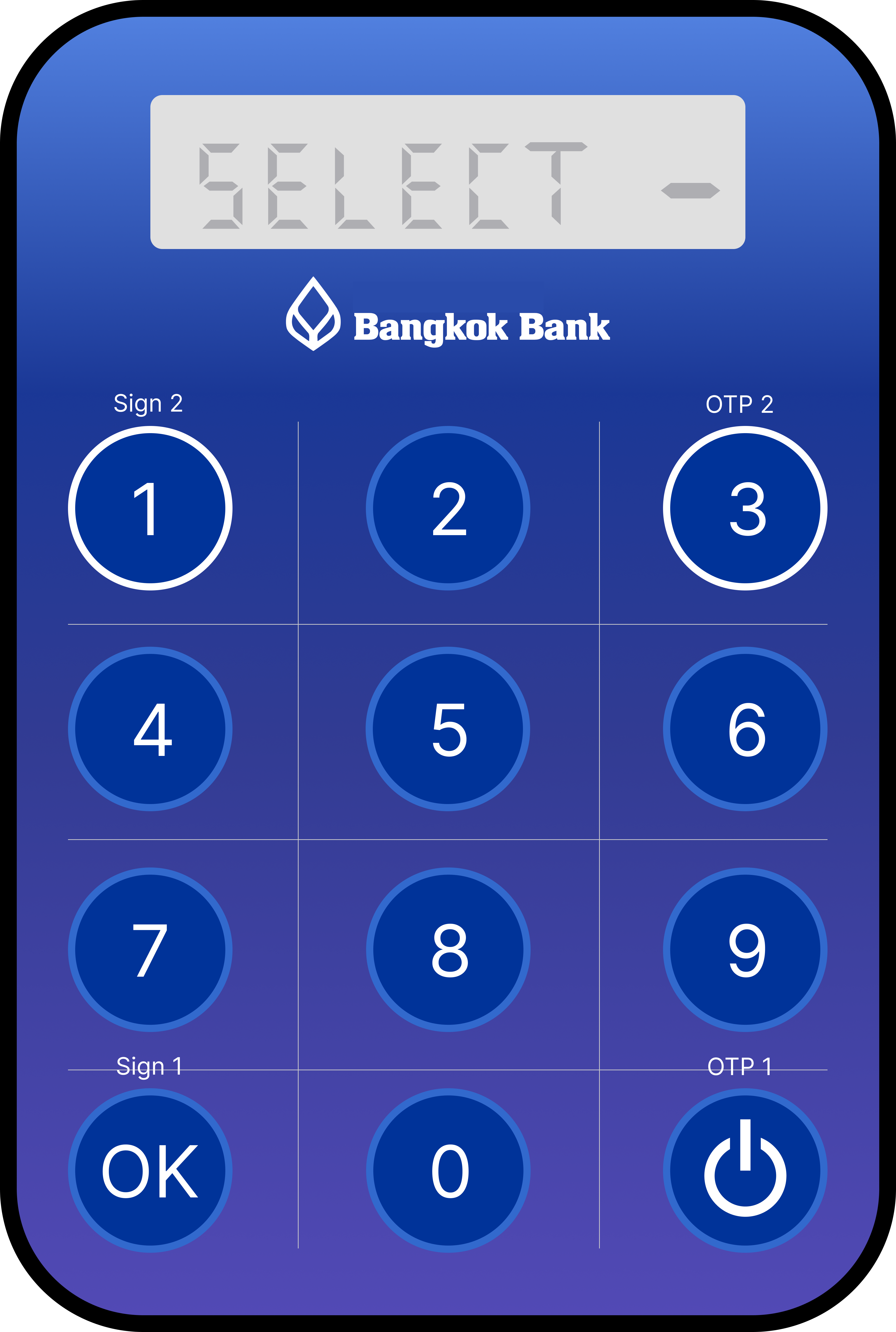
เพื่อความต่อเนื่องในการใช้งาน กรุณาตรวจสอบความพร้อมของเครื่องโทเค็นของท่านเป็นระยะ ในกรณีเครื่องโทเค็นแบตเตอรี่ใกล้หมด
ที่หน้าจออาจแสดงข้อความเตือน 2 แบบ ดังนี้
หากท่านพบข้อความข้างต้น ท่านสามารถขอเปลี่ยนเครื่องโทเค็นใหม่ได้ที่ ศูนย์บริการลูกค้าธุรกิจ โทร. 02 031 7888
|
|
|
ตัวอย่าง รูปที่ 1 |
ตัวอย่าง รูปที่ 2 |
Token Device Maintenance Guidelines for Continuous Availability
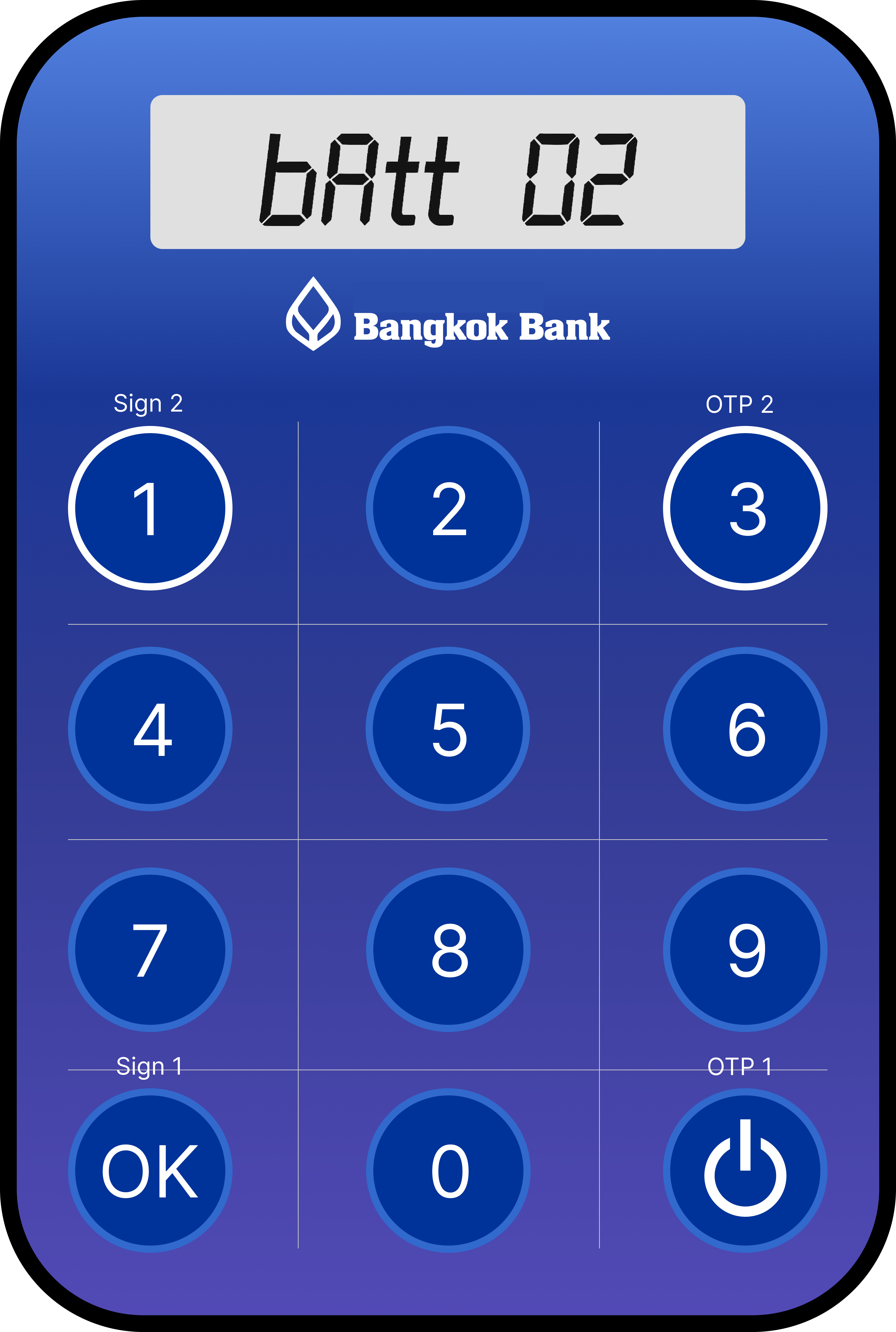
To ensure uninterrupted access to service, please regularly check the status of your token device. If the battery is running low, the screen may display one of the following warning messages:
If you encounter either of these issues, you may request a replacement device by contacting the Corporate Service Center
at 02 031 7888.
|
|
|
Figure 1 |
Figure 2 |
|
Do not display this page again |